Pool Window
Pool cards appear in the Wallet tab of the Dex page — under Liquidity pools for positions you opened yourself and under Delegated liquidity for positions funded into operator-managed vaults. Collapsed, a card shows the pair, your value and status; expanded, it opens the full Pool Window.
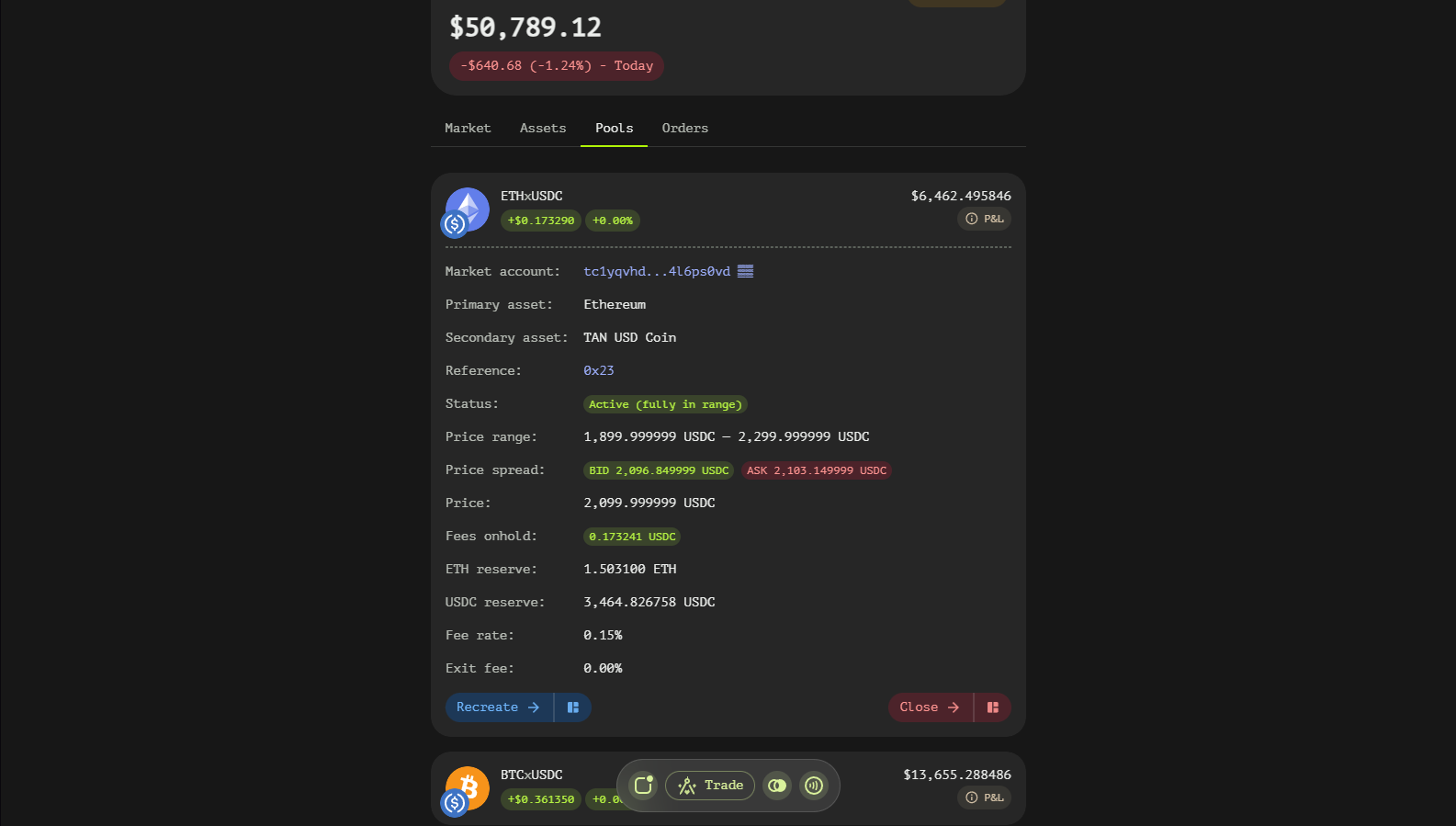
Pool Window Fields
General Information
- Market account — the market contract the pool belongs to (linked to its portfolio view).
- Primary asset / Secondary asset — the two sides of the pair (BTC and USDC in BTC/USDC).
- Reference — the internal pool ID assigned by the contract, in hex, copyable.
- Status —
Active,Partially active (out of range)for concentrated pools whose range no longer contains the market price, orInactiveonce closed.
Price and Range
- Spread — the bid/ask quotes implied by the pool's current composition.
- Price — the pool's marginal price from the token ratio.
- Price range — for concentrated liquidity pools (CLP), the lower and upper bounds of your position.
Reserves and Revenue
- Primary/Secondary reserve — how much of each token the position currently holds.
- Fees — trading fees accrued on top of the reserves, per token.
- Revenue — the estimated absolute revenue and the relative return of the position.
Fee Structure
- Fee rate — the percentage taken from each swap routed through the pool and paid to liquidity providers.
- Exit fee — the fee charged when closing the position.
Delegated Pool Extras
Delegated positions — funds entrusted to an operator's range — additionally show:
- Your share — your portion of the pool.
- Fees earned (est.) — your accrued share of trading fees.
- TAN subsidy — incentive rewards paid in TAN, if any.
- Delegator account — the operator account managing the position (linked to its portfolio view).
Using the Pool Window
- Identify the pool by market account and asset pair.
- Watch Status — an out-of-range concentrated position stops earning swap fees.
- Compare Price against your Price range before adding or withdrawing.
- Track reserves and revenue to judge performance, and factor the exit fee into your timing.